Anything AI.
On your Mac.
The AI platform for Mac.
Chat, voice, vision, image, video, code, automation — every AI workflow running on Apple Silicon. No cloud, no API keys, no limits.
Free · Apple Silicon · macOS 26+
The Pipeline Builder
A visual canvas for building AI workflows. Drag, connect, and run — right in your browser.
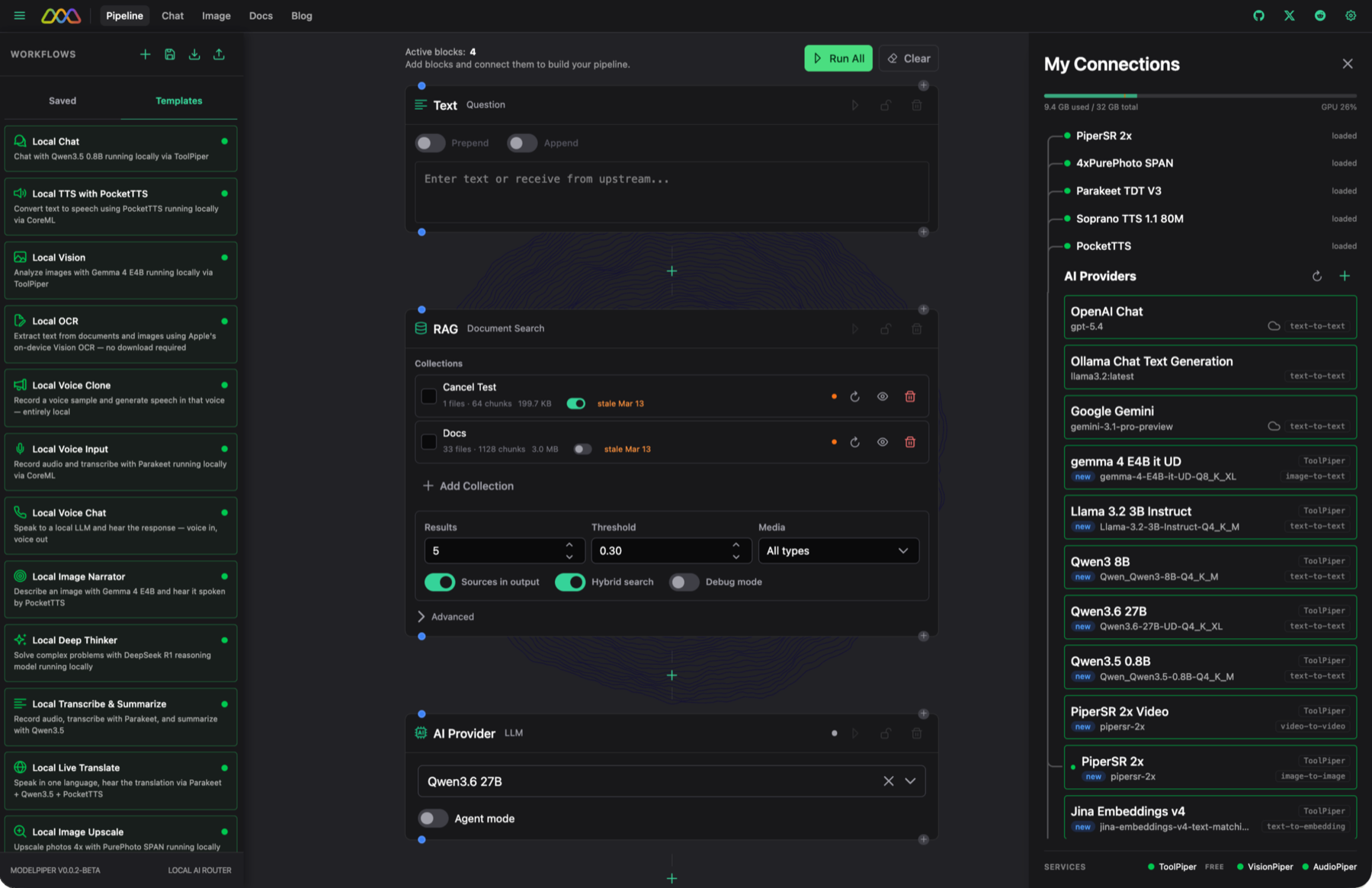
Block-Based
Snap together prompt, model, response, and vision blocks to create multi-step AI pipelines.
Any Model
Works with Ollama, OpenAI, Anthropic, Groq, and any OpenAI-compatible endpoint.
Browser-Based
No installation needed. Open the web app and start building immediately.
ToolPiper for macOS
A menu bar companion that bundles local AI inference. One click to download models, run them on-device, and read unified logs.
Curated Model Library
Browse and install models with one click. LLMs, vision models, and TTS engines — all pre-configured.
Bundled Inference
llama.cpp, Apple Intelligence, speech-to-text, and text-to-speech — all running on your hardware.
Unified Logs
Every HTTP request, response, and error from all backends in one searchable stream.
Zero Config
Download a model, launch, and go. ToolPiper handles inference, model management, and server lifecycle.
Requires macOS 26 or later
VisionPiper
Real-time camera and screen analysis powered by local vision models.
- Live camera feed analysis with local vision models
- Screen capture and OCR pipelines
- Custom vision workflows with the pipeline builder
- Runs entirely on-device — no cloud uploads
From the Blog
Technical writing on local AI, MCP servers, on-device inference, and AX-native browser testing.
Accessibility-Native Testing: Why the AX Tree Is the Right Abstraction for Selectors
The technical case for testing against Chrome's real accessibility tree instead of the DOM.
AX-Native Browser Automation: Why We Built Our Own CDP Engine
A custom Chrome DevTools Protocol engine that queries the AX tree directly. Self-healing in 5 to 15 ms.
Give Claude 147 macOS Superpowers with One MCP Server
ToolPiper exposes 147 local tools to any MCP-compatible AI agent. One stdio binary, no cloud.
Apple Intelligence vs Open Models on Mac
When the Foundation Models Framework wins and when llama.cpp wins. Routing strategy that uses both.
The AI Agent Feedback Loop Is Broken. Here's the Fix.
Why terminal output is write-only memory for AI coding agents, and what a queryable log store changes.
Local AI Agents on Mac: Build and Run Without the Cloud
A tour of the local-first agent stack: inference, tools, memory, and orchestration on Apple Silicon.
Run an MCP Server Locally on Mac
Setup guide for stdio and HTTP transports, with Claude Code, Cursor, and Windsurf integration.
Run a Local OpenAI-Compatible API on Mac
A drop-in replacement for the OpenAI API that runs entirely on your machine.
How It Works
Three steps to your first AI pipeline.
Install ToolPiper
Download the macOS menu bar app. Pick a model and it downloads — ready to run on your hardware.
Open the Web App
Launch the pipeline builder in your browser. Add blocks, pick a model, and wire them together.
Run Your Pipeline
Hit run. Your prompts flow through connected models — streaming responses in real time.
Your Data Stays on Your Mac
ModelPiper runs entirely on your machine. Your prompts, responses, and workflows never leave your device — unless you choose a cloud provider.
Explore plans
Free for everyone. Pro for the full toolkit. Studio and Max coming soon.
Free
Try ModelPiper at no cost.
- Local chat with bundled model
- Basic voice & transcription
- Connect your own API keys (Ollama, OpenAI, Anthropic)
- Visual pipeline builder
- All 147 MCP tools (browser, system, files)
- Free companion apps (VisionPiper, AudioPiper, MediaPiper)
Pro
For daily AI users who want the full toolkit.
- Everything in Free
- All 9 inference backends
- Apple Intelligence integration
- Full voice suite (TTS + STT)
- Local RAG over your files
- Multi-model switching
- Unlimited model downloads
Studio
For content creators and marketers.
- Everything in Pro
- Image upscaling (ANE-native)
- Video upscaling (60fps real-time)
- Video editing pipeline
- Pose detection (60fps streaming)
- Outreach toolkit (queue, posting, Firehose)
Max
For developers and QA engineers.
- Everything in Studio
- CodePiper (IDE AI extension)
- PiperTest (self-healing browser tests)
- Full browser automation (CDP + AX)
- API discovery toolkit
- Priority support
Get Notified When v1 Launches
Be the first to know when ToolPiper leaves beta and VisionPiper drops.